
Large Digit Displays: A Complete Guide to High-Visibility Industrial Information Systems
In sprawling industrial facilities, warehouses, and production floors where operators work at distances of tens or hundreds of feet from control equipment, traditional instrumentation becomes invisible. A standard panel meter with half-inch digits readable from ten feet away provides no value when the nearest operator stands fifty feet from the display. Critical information—production counts, equipment status, process temperatures, vehicle weights, or safety parameters—remains unseen, forcing operators to walk to control stations repeatedly or rely on outdated manual boards that require constant updating.
Large digit displays solve this fundamental visibility problem by presenting measurement and status information in digits large enough to read at substantial distances. With digit heights ranging from 2.2 inches (57 mm) to 7.9 inches (200 mm) or more, these specialized displays make critical data visible across plant floors, throughout industrial yards, in transportation facilities, and anywhere operators need real-time information without approaching control equipment. Modern large digit displays combine this essential visibility with the sophistication of contemporary industrial electronics—accepting diverse input signals, providing network communication, triggering alarms, and withstanding harsh environmental conditions that would destroy conventional displays.
This comprehensive guide explores large digit display technology, examining how these devices work, where they excel, and how to select and deploy them effectively. Understanding the capabilities and limitations of large digit displays helps engineers and facility managers make informed decisions about improving operational visibility and efficiency through strategic placement of readable, reliable information displays.
Understanding Large Digit Display Technology
A large digit display is fundamentally a specialized digital measurement or information device optimized for visibility at distance. While standard industrial instruments prioritize compact panel mounting, large digit displays sacrifice space efficiency for readability, using oversized digit formations that remain legible from viewing distances that render conventional displays useless.
The core principle governing large digit displays is straightforward: viewing distance correlates directly with digit height. As a rule of thumb, maximum practical viewing distance in feet equals roughly 40 times the digit height in inches. A display with 2-inch digits remains readable to about 80 feet. Four-inch digits extend this to 160 feet. Eight-inch digits, the largest standard size, can be read from over 300 feet away in good lighting conditions. This relationship provides a starting point for sizing displays, though actual viewing distance depends on ambient lighting, digit brightness, viewer acuity, and whether the viewer needs to simply detect digits or read precise values.
LED Display Technology and Construction
Large digit displays overwhelmingly use LED technology for digit formation. LEDs emit their own light rather than relying on external illumination, providing excellent visibility in dim environments and acceptable visibility even in bright sunlight when outdoor-rated displays are specified. The construction approach varies with digit size and application requirements.
Smaller large digit displays, typically those with 2.2-inch (57 mm) or 4.0-inch (102 mm) digits intended for indoor use, often use solid segment construction. Each segment of the seven-segment digit pattern consists of a continuous piece of LED material encapsulated in colored epoxy—usually red, though green, amber, and other colors are available. These solid segments provide uniform brightness across the digit, crisp edges, and good visibility from wide viewing angles. The segments mount behind a protective lens or window that may include filtering to enhance contrast.
Larger displays and those intended for outdoor use typically employ pixel-based construction, where each segment comprises an array of individual 5mm LED pixels. This modular approach allows construction of very large digits — 5.9 inches (150 mm), 7.9 inches (200 mm), or even larger custom sizes—that would be impractical with solid segments. Pixel-based displays also enable higher brightness levels essential for outdoor visibility. The individual LEDs are spaced close enough that from normal viewing distances, segments appear continuous rather than dotted. The pixel approach also facilitates mixing colors or creating multi-line displays with different information types.
Display housings protect the LED assemblies from environmental hazards. Indoor displays might use relatively simple sheet metal or plastic enclosures with front panel sealing adequate to meet NEMA 4 or IP65 ratings, protecting against dust and water spray. Outdoor displays require more robust construction with gasket-sealed enclosures, weather-resistant cable entries, and sometimes internal heating elements to maintain operation in freezing conditions. The housing must provide adequate heat dissipation for the LEDs while protecting them from moisture, vibration, and temperature extremes.
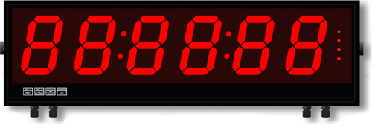 Figure 1: Large digit displays with 8-inch characters provide visibility up to 320 feet
Indoor versus Outdoor Brightness
LED brightness requirements differ dramatically between indoor and outdoor applications. Indoor displays, operating in controlled lighting where ambient illumination rarely exceeds a few hundred foot-candles, use standard-brightness LEDs. These provide adequate visibility for reading across plant floors, warehouses, or control rooms without consuming excessive power or generating problematic heat. Standard brightness typically ranges from 100 to 500 candelas per square meter, plenty for indoor viewing.
Outdoor displays face full sunlight, which can exceed 10,000 foot-candles. Reading a display in direct sunlight requires dramatically higher LED brightness to maintain adequate contrast between lit and unlit segments. Outdoor-rated displays employ high-brightness LEDs producing 5,000 to 10,000 candelas per square meter or more. This increased brightness comes at the cost of higher power consumption and more heat generation, requiring more substantial power supplies and better thermal management.
The distinction between indoor and outdoor brightness isn't always absolute. Some applications in high-bay manufacturing facilities with skylights or large windows might benefit from outdoor-brightness displays even though they're technically indoors. Conversely, outdoor locations with significant shading might work with standard brightness. Consider actual lighting conditions at the installation location rather than simply indoor versus outdoor classification.
Internal Processing and Intelligence
Behind the highly visible display, large digit displays contain sophisticated electronics that process input signals and manage display functions. A microprocessor handles signal conditioning, scaling, and formatting for various input types. The processor might accept process signals like 4-20 mA or 0-10V, serial data streams via RS232 or RS485, frequency or pulse inputs from sensors, or even strain gauge signals from load cells for weighing applications.
The processor implements user-configured scaling to convert raw input signals into meaningful displayed values. A 4-20 mA signal from a pressure transmitter might scale to display 0-100 PSI. A pulse input from a production counter scales to show parts produced. Linearization capabilities compensate for nonlinear sensors, applying multi-point curves that map input values to correct display readings. Digital filtering averages readings to reduce display jitter in noisy environments while maintaining reasonable response speed.
Many large digit displays include relay outputs that activate when displayed values reach programmed setpoints. These relays enable simple alarm or control functions directly from the display—activating warning lights when production falls below targets, triggering equipment shutdown when temperatures exceed limits, or controlling material flow based on weight measurements. The display becomes not just an information device but an active participant in process control.
Sizing and Viewing Distance Considerations
Selecting appropriate digit size represents the most critical decision in specifying large digit displays. Too small, and the display fails its primary purpose of providing visibility. Too large, and you've spent unnecessarily on an oversized display that might not fit available space. Systematic analysis of viewing distance requirements guides proper sizing.
Calculating Required Digit Height
Begin by determining the maximum distance from which operators need to read the display. Walk the facility and identify typical operator positions during normal operations. Consider not just the closest approach but the farthest distance at which reading the display would be useful. In a production area, operators might work anywhere within a 100-foot radius of the display location. The display must be readable from the full 100 feet, not just from close range.
Apply the 40:1 rule as a starting point: viewing distance in feet divided by 40 gives minimum digit height in inches. For 100-foot viewing distance, you need at least 100 ÷ 40 = 2.5 inch digits. Standard sizes are typically 2.2, 4.0, 5.9, and 7.9 inches, so you'd select 4-inch digits to ensure comfortable readability at the required distance. The rule provides conservative estimates—many people can read somewhat smaller digits at a given distance, but you want the display readable by all personnel including those with less than perfect vision.
Environmental conditions modify these calculations. Bright ambient lighting reduces effective viewing distance, as does dusty or hazy air. Vibration from nearby machinery might make reading more difficult, suggesting slightly larger digits for the same viewing distance. If operators need to read the display while moving or operating equipment, allowing larger digit sizes than the minimum calculated improves reliability. When in doubt, err toward larger digits—the marginal cost difference is usually modest compared to the consequences of an unreadable display.
Number of Digits and Display Format
Large digit displays typically offer 4-digit or 6-digit formats. The choice depends on the range of values to display and required resolution. A 4-digit display shows values from 0000 to 9999, adequate for many applications. Production counts rarely need more than four digits during a shift. Temperature displays reading to 999.9 degrees fit comfortably in four digits including decimal point. Weight displays to 9,999 pounds work with four digits.
Six-digit displays accommodate larger values or higher resolution. Cumulative production totals for a day might require six digits. Precision weighing to 0.1-pound resolution over a 10,000-pound range needs six digits (showing 10000.0). Utility metering displaying kilowatt-hours over months of accumulation uses six digits. The additional digits increase display size and cost proportionally, so specify six digits only when actually needed rather than as a general practice.
Consider decimal point placement carefully. The decimal point may be fixed in position or programmable depending on the display model. For applications requiring flexible decimal placement—perhaps displaying 999.9 for one measurement and 99.99 for another—ensure the display supports programmable decimal position. Fixed decimal position costs less and suffices when the application is clearly defined.
Physical Size and Mounting Space
Large digit displays are, unsurprisingly, large. A 7.9-inch (200 mm), 4-digit display measures approximately 29.5 inches wide by 11.4 inches tall, while a 6-digit version of the same digit height extends to about 42.2 inches wide, with a case depth of only 3.0 inches (75 mm). Verify that you have adequate mounting space before specifying digit size. Wall mounting requires a flat surface large enough to accommodate the display. Overhead mounting from ceiling structures needs sufficient clearance and structural support for the display's weight. Consider viewing angles too—displays mounted too high or off to the side may be difficult to read despite adequate digit size.
Depth matters particularly for panel mounting or installation in tight spaces. Displays might extend 3 to 6 inches behind the mounting surface, requiring clearance for the housing and wire entry. Some locations that appear suitable from the front lack adequate depth clearance. Measure carefully and review manufacturer specifications before committing to a mounting location.
 Figure 2: Multiple digit heights accommodate viewing distances from 90 to 320 feet
Input Signal Types and Applications
Large digit displays must accept and display data from various sources. The input type fundamentally determines what the display shows and how it connects to existing systems. Understanding available input types and matching them to your data source is essential for successful implementation.
Process Signal Inputs
Process signals, particularly 4-20 mA current loops and 0-10V analog voltages, represent the most common industrial measurement signals. Displays accepting process signals connect directly to transmitters, controllers, or other instruments outputting these standard signals. A temperature transmitter monitoring a process outputs 4-20 mA proportional to temperature; the large digit display accepts this signal, scales it according to user programming, and shows temperature in degrees. Similarly, a pressure transmitter's 4-20 mA output drives a display showing pressure in PSI or bar.
Process signal displays typically include user-programmable scaling that maps the input range to desired display values. You program the display to show 0 when it receives 4 mA and 100 when it receives 20 mA, automatically providing proper scaling. Advanced displays offer linearization for nonlinear relationships, useful when the relationship between the 4-20 mA signal and the actual measured parameter isn't linear—for example, level measurement in non-cylindrical tanks or flow measurement based on differential pressure.
Serial Data Inputs
Serial communication allows large digit displays to show data from PLCs, computers, or instruments equipped with serial interfaces. RS232 and RS485 serial standards are most common, with RS485 preferred for industrial applications due to its noise immunity and ability to communicate over longer distances. The display acts as a serial slave device, accepting commands from a master controller that specify what value to show.
Serial input displays excel when showing calculated values, status information, or data from sources without analog outputs. A packaging line might send the current production count from its PLC to a serial display visible across the plant floor. A quality control system sends pass/fail rates to displays in the production area. Inventory management systems update displays showing current stock levels or materials consumption. The versatility of serial communication enables displaying virtually any numerical data that a control system can calculate or track.
Configuration typically specifies communication parameters (baud rate, data bits, parity), device address if multiple displays share a bus, and data format. Some displays accept ASCII text, displaying whatever numeric value arrives in the data stream. Others use proprietary protocols requiring specific command formats. Ensure compatibility between your controller's communication capabilities and the display's requirements.
Frequency and Pulse Counting Inputs
Frequency input displays accept pulse trains from sensors and display either instantaneous frequency (rate) or accumulated counts (totals). Applications include flow measurement from turbine meters outputting pulses proportional to flow, production counting from proximity sensors detecting passing parts, conveyor speed from encoders or tachometers, and various motion control applications. The display can typically switch between rate and total modes, showing either current speed or accumulated quantity.
Scaling factors convert raw pulse frequency to engineering units. A turbine flow meter might output 1000 pulses per gallon; program the display with this scaling factor, and it shows flow in gallons per minute directly. Production counters might display parts directly if each pulse represents one part, or apply scaling if each part triggers multiple pulses. Totalizing functions integrate pulses over time, showing accumulated volume, total parts produced, or distance traveled.
Reset capabilities allow clearing totals on command, essential for batch operations or shift tracking. Some displays maintain both resettable totals and grand totals that never reset, useful for showing shift production while also tracking lifetime production. Reset might occur via front panel button, remote contact closure, or serial command, depending on display capabilities and application requirements.
Load Cell and Strain Gauge Inputs
Specialized displays designed for weighing applications accept signals directly from load cells or strain gauges. These sensors produce millivolt-level signals proportional to weight or force, requiring sensitive amplification and precise excitation voltage. Large digit displays for weighing include built-in excitation supplies (typically 5V or 10V) and high-resolution amplifiers that resolve the tiny voltage changes representing weight variations.
Vehicle scales at industrial sites exemplify this application. Load cells under the scale platform generate signals as vehicles drive on. A large digit display, typically 6 or 8 inches for visibility from the driver's position and scale operator's office, shows vehicle weight. Tare functions subtract vehicle weight to show net load. Peak hold captures maximum weight during the weighing cycle. The large, easily read display eliminates errors from misread weights and provides clear documentation when weight tickets are printed.
Tank weighing systems use the same technology at different scales. Multiple load cells under a storage tank feed a display showing contents weight or volume. The large display might mount at a convenient viewing point, allowing operators to check inventory without climbing to instrument panels or interrogating control systems. Process batching operations use weighing displays to show material additions in real time, ensuring accurate recipes.
Mounting Options and Installation
Large digit displays offer multiple mounting configurations to suit different installation requirements. Selecting the appropriate mounting method depends on the facility structure, viewing requirements, and environmental conditions.
Panel Mounting
Panel mounting installs the display flush into a flat surface, typically a wall, partition, or large control panel. The display housing protrudes behind the mounting surface, with only the display face and bezel visible from the front. This creates a clean, integrated appearance and protects the display from accidental damage. Panel mounting works well indoors where the mounting surface provides weather protection, though outdoor-rated displays can panel-mount into weatherproof enclosures.
Installation requires cutting an appropriately sized rectangular opening in the mounting surface. The display typically includes mounting brackets or clips that secure it from behind after inserting through the cutout. Ensure adequate clearance behind the mounting surface for the display housing and cable connections. Panel mounting provides good protection against weather and vandalism since only the front face is exposed.
Wall Mounting
Wall mounting attaches the display housing directly to a wall or structural surface using brackets or backplates. The entire display housing remains visible, projecting from the mounting surface. This approach works indoors or outdoors and doesn't require cutting mounting surfaces. Wall mounting offers flexibility since the display can attach to any reasonably flat surface strong enough to support its weight.
Ensure adequate structural support—larger displays can weigh 20 pounds or more, requiring secure attachment to studs, structural members, or reinforced surfaces. Consider viewing angle when positioning wall-mounted displays. Mounting too high forces viewers to look up at an angle that may cause glare or make reading difficult. Mounting at or slightly above eye level from the primary viewing location generally provides the best visibility.
Suspension Mounting
Suspension mounting hangs displays from overhead structures like ceiling beams, bar joists, or truss members. This approach provides excellent visibility in high-bay facilities where wall mounting would place displays too high and panel mounting might not be feasible. The display hangs so its face is visible from below, often oriented to be readable from multiple directions in the facility.
Suspension hardware must safely support the display weight with adequate safety factor. Use rated lifting attachments and ensure overhead structures can handle the load. Consider cable management for suspended displays, routing power and signal cables neatly along support chains or through conduit. Suspended displays may need guy wires or bracing to prevent swaying in facilities with air movement or overhead crane operation.
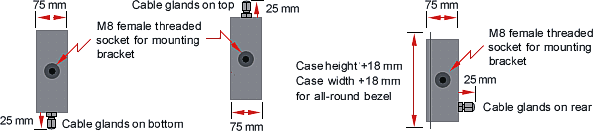 Figure 3: Flexible mounting options accommodate diverse installation requirements
Environmental Protection and Weatherproofing
Large digit displays often operate in challenging environments that would destroy unprotected electronics. Understanding environmental ratings and protection methods helps ensure display longevity in demanding applications.
NEMA and IP Ratings
Environmental protection ratings quantify a display's resistance to water, dust, and other contaminants. NEMA (National Electrical Manufacturers Association) and IP (Ingress Protection) ratings provide standardized classifications. NEMA 4 or 4X ratings indicate the enclosure protects against windblown dust and rain, splashing water, and hose-directed water, suitable for most outdoor applications. The 4X designation adds corrosion resistance, important in chemical plants or marine environments.
IP ratings use a two-digit code: the first digit indicates solid particle protection, the second liquid protection. IP65 provides dust-tight protection (first digit 6) and protection against water jets from any direction (second digit 5), equivalent to NEMA 4. Higher ratings like IP66 or IP67 offer additional protection against heavy seas or temporary immersion, useful in extreme applications but generally unnecessary for most industrial installations.
Achieving these ratings requires careful design. Gasket-sealed enclosures prevent water and dust entry. Cable entries use sealed glands with compression fittings that maintain sealing around cables. Front windows seal to the housing with gaskets compressed by the bezel. All seams and joints must seal completely. Regular inspection of seals and gaskets, replacing them when cracked or compressed, maintains protection over time.
Temperature Considerations
Operating temperature range limits where displays can reliably function. Standard industrial displays typically rate for 0°C to 50°C (32°F to 122°F), adequate for climate-controlled facilities. Extended temperature range displays handle -20°C to 60°C (-4°F to 140°F) or broader, necessary for outdoor installations in cold climates or hot industrial processes.
Cold weather affects both LEDs and electronics. LED brightness decreases at very low temperatures, though this usually doesn't cause visibility problems except in extreme cold. Electronics may malfunction or fail to start below their rated temperature range. For displays operating in freezing conditions, internal heating elements maintain minimum operating temperature. These heaters activate automatically when internal temperature drops below threshold, consuming additional power but ensuring reliable winter operation.
High temperatures primarily affect display longevity. LEDs operating at elevated temperatures age faster, gradually losing brightness over years. Ensure adequate ventilation for displays in hot environments or direct sun exposure. Some installations benefit from sun shades or awnings that reduce solar heating while maintaining display visibility. In extreme heat applications, consider active cooling or specify displays with higher temperature ratings and LED current derating for longer life.
Vibration and Shock Resistance
Displays near heavy machinery, crane runways, or roadways experience vibration that can damage electronics or loosen connections. Industrial-grade displays use robust construction with secured components, locked-down connectors, and vibration-resistant terminal blocks. In extreme vibration environments, consider mounting displays on vibration isolation pads or away from the most severe vibration sources.
Shock from impacts, dropped objects, or transportation equipment requires protective measures. Recessed mounting protects the display face from direct impacts. Protective cages or barriers prevent forklift or vehicle contact. In warehouses or areas with moving equipment, locate displays where accidental contact is unlikely or provide physical protection that intercepts impacts before they reach the display.
Applications Across Industries
Large digit displays serve diverse applications across industrial, commercial, and institutional settings. Understanding these applications provides context for appreciating where visibility matters most and how displays integrate into operations.
Manufacturing and Production
Manufacturing facilities use large digit displays extensively to communicate production status, equipment conditions, and quality metrics. Production count displays mounted where entire crews can see them show current output, creating transparency and motivating performance. Operators immediately know if production lags behind schedule, enabling proactive responses. Management walking the floor gets instant status without interrupting operators or checking computer systems.
Process monitoring displays show critical temperatures, pressures, or other parameters that affect product quality or safety. A large display showing oven temperature lets all nearby personnel verify proper conditions without approaching control panels. Pressure displays on hydraulic systems provide visibility into equipment status from across the floor. The displays don't replace detailed instrumentation but supplement it with at-a-glance visibility of the most critical values.
Line speed displays help coordinate operations across multiple stations. In packaging or assembly operations where upstream and downstream processes must synchronize, visible speed displays allow operators to match rates without constant radio communication. Batch processing operations show current recipe step, time remaining, or quantities added, keeping all personnel informed of process status.
Warehouse and Logistics
Warehouses and distribution centers employ large digit displays for inventory visibility, shipping metrics, and equipment monitoring. Inventory displays showing stock levels for key items help receiving and picking personnel understand availability without checking computer terminals. Orders filled, orders remaining, or pick accuracy percentages displayed prominently communicate performance to the entire shift.
Vehicle scales in shipping and receiving areas use large displays readable from driver seats and scale operator positions. The driver sees their displayed weight and knows when to stop driving onto the scale. The operator reads the weight from their station for recording on shipping documents. Eight-inch digits provide visibility from both positions simultaneously, speeding scale operations.
Temperature monitoring in cold storage facilities uses displays visible from outside controlled areas. Facility personnel verify proper cold storage temperatures without entering the space, reducing temperature fluctuations from door openings and improving energy efficiency. Alarm conditions trigger prominently when temperature drifts from specification, enabling quick response before product spoilage.
Mining, Aggregate, and Heavy Industry
Mining operations and aggregate processing plants span large areas where communication between locations is difficult. Large digit displays at conveyor systems show material flow rates, allowing operators to coordinate loading and processing from visual displays rather than radio communication. Outdoor-rated displays withstand the harsh, dusty, often wet conditions common in these operations.
Quarry truck scales weigh loaded vehicles using large displays visible to drivers, scale attendants, and supervisors. The rugged outdoor displays survive weather extremes, dust, and vibration from constant heavy truck traffic. Totalizing displays track daily aggregate production by type, providing management visibility into operations without manual record compilation.
Material processing equipment like crushers, screens, and wash plants use displays showing throughput rates, motor currents, or process variables. Operators monitor displays while operating equipment, adjusting feed rates or operating parameters based on visible conditions. The displays withstand vibration, dust, and moisture that would destroy conventional instruments.
Transportation and Vehicle Facilities
Transportation facilities including truck terminals, rail yards, and ports use large displays for vehicle and cargo information. Weigh stations display vehicle weights to drivers and enforcement personnel simultaneously. Loading docks show vehicle position numbers or status information. Container yards display stack weights or container counts visible to equipment operators and yard coordinators.
Parking facilities use count displays showing available spaces, guiding drivers to areas with capacity. The displays typically mount at entrances and decision points, with digit sizes chosen for visibility from moving vehicles. Vehicle wash facilities display wash type or status to guide drivers through automated systems.
Agricultural and Food Processing
Agricultural operations use large digit displays for grain handling, livestock operations, and processing facilities. Grain elevators display receiving weights to farmers delivering grain and elevator operators recording transactions. Storage bin level displays show remaining capacity visible across the facility. Dryer temperature displays allow monitoring of grain conditioning processes from multiple locations.
Food processing plants display batch weights, cooking temperatures, or packaging rates. Clean room environments require displays with appropriate sanitary construction and cleaning compatibility. Washdown areas use displays rated for high-pressure cleaning. The displays provide process visibility while meeting food safety and sanitation requirements.
Energy and Utilities
Power generation facilities display critical parameters like generator output, frequency, or system voltage. Large displays in control rooms show key values visible to entire operating crews. Outdoor displays at switchyards or substations show voltage or power flow to maintenance personnel without requiring them to access control buildings or protective relay equipment.
Water and wastewater treatment plants use displays for flow rates, tank levels, and treatment process variables. Operators touring the facility see current conditions at each process area without returning to control rooms. Remote pump stations include displays showing flow or pressure visible during service visits, simplifying troubleshooting and maintenance.
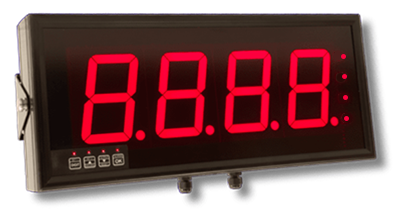 Figure 4: Outdoor-rated displays withstand weather while maintaining visibility in direct sunlight
Configuration and Programming
Large digit displays require configuration to match input signals to displayed values and enable optional features. Understanding configuration methods and options helps implement displays that work correctly from commissioning.
Front Panel Programming
Most large digit displays include front panel buttons for local configuration. Button access may be protected by a lockable cover or security setting that prevents unauthorized changes once configured. Programming typically involves selecting parameters from menus displayed on the digits themselves, using the buttons to navigate menus and adjust values.
Common configuration parameters include input type selection (4-20 mA, 0-10V, serial, frequency, etc.), input scaling to map signal range to display values, decimal point position, brightness adjustment, and setpoint programming for relay outputs. Some displays allow selecting displayed units or entering custom text that shows briefly on power-up. More advanced features like linearization or custom calibration may require external software rather than front panel programming.
Front panel programming works well for simple applications or standalone displays. For multiple identical displays, manually programming each unit becomes tedious and error-prone. Consider whether displays can be pre-configured by the supplier or whether software tools would speed deployment in installations with many displays.
Software Configuration Tools
Displays with serial communication interfaces often support configuration via computer software. The software connects to the display through a serial port, presenting graphical interfaces for parameter adjustment more convenient than front panel button pushing. Configuration software typically allows saving settings to files, enabling rapid configuration of additional displays by loading saved settings rather than manually re-entering parameters.
Software tools become particularly valuable for advanced features like multi-point linearization, where programming many input-output pairs via front panel buttons would be impractical. The software might include calibration wizards that guide through applying reference signals and automatically calculating correction factors. Some tools support batch operations, configuring multiple displays connected to a shared serial bus without individually addressing each display.
Remote Configuration and Monitoring
Displays networked via Ethernet or serial interfaces can be configured and monitored remotely without physical access. This capability proves valuable for displays in difficult-to-access locations like high mounting positions, outdoor installations, or hazardous areas. Remote configuration also simplifies making adjustments after initial installation—scaling changes, setpoint adjustments, or display format modifications can be performed from an office rather than requiring field visits.
Remote monitoring allows checking display status, verifying proper operation, or troubleshooting problems without site visits. Some displays report diagnostic information like input signal levels, internal temperature, or operating hours through their communication interfaces. This remote visibility helps identify problems before they cause failures and simplifies troubleshooting when issues occur.
Maintenance and Troubleshooting
While large digit displays are generally robust and low-maintenance, periodic attention ensures continued reliable operation and helps identify problems before they cause display failures.
Routine Inspection and Cleaning
Schedule periodic inspections of large digit displays, perhaps quarterly or semi-annually depending on environment. Check that all digits illuminate properly—dim or dark segments indicate LED failures requiring attention. Verify that displayed values make sense and respond appropriately to changing inputs. Inspect mounting hardware for looseness or corrosion. Check cable connections for tightness and signs of damage or moisture entry.
Clean display faces regularly, particularly in dusty or dirty environments. Accumulated dirt reduces visibility and makes displays harder to read. Use soft cloths and appropriate cleaners—avoid abrasive materials that might scratch protective windows. For outdoor displays, check and clean drainage channels that prevent water accumulation. Verify that gaskets and seals remain in good condition, replacing them if cracked or compressed.
Common Problems and Solutions
Blank or dark displays typically indicate power problems. Verify that power supply voltage reaches the display terminals and falls within specification. Check fuses or circuit breakers protecting the display power. For displays powered through the signal input (2-wire transmitter mode), ensure the input circuit provides adequate power.
Incorrect readings suggest configuration problems or input signal issues. Verify that input type settings match the actual input signal. Check scaling parameters to ensure proper conversion from input signal to displayed value. Measure the input signal directly to confirm it's within expected range and corresponds to actual conditions. Incorrect readings that vary systematically—always high or low by a consistent amount—often indicate scaling or offset errors in configuration.
Flickering or unstable displays may result from electrical noise on input signals or power supply. Check signal cable routing—keep signal wiring away from power cables or sources of electrical noise. Verify that cable shields connect properly and that grounding follows recommended practices. For process signal inputs, confirm that the signal source and display share proper ground references. Power supply voltage fluctuations can cause display instability; measure supply voltage under load to identify power quality issues.
Failed segments or digits require LED replacement, typically a factory repair. Some displays use modular LED assemblies that can be field-replaced, while others require returning the complete unit. LED failures occur gradually over time as cumulative operating hours reach end of life, or suddenly from electrical transients or physical damage. If multiple segments fail simultaneously, suspect electrical problems like power surges rather than normal LED aging.
LED Life and Long-Term Reliability
LED displays have finite lifetimes, typically rated at 50,000 to 100,000 hours of operation. This translates to roughly 6 to 11 years of continuous 24/7 operation before LEDs begin to noticeably dim. Actual life depends on operating conditions—high temperatures, high brightness settings, and electrical stress accelerate aging. Conversely, reduced brightness settings and cool operating environments extend life.
As LEDs age, brightness decreases gradually. This degradation is usually uniform across all segments, maintaining readability but reducing maximum viewing distance or visibility in bright ambient light. If a display becomes too dim to read comfortably, LED replacement or display replacement becomes necessary. Planning for eventual replacement and budgeting for it as part of total cost of ownership prevents surprises when displays reach end of life.
Selection Guidelines and Best Practices
Selecting appropriate large digit displays requires balancing multiple factors: visibility requirements, input compatibility, environmental conditions, features, and budget. A systematic approach helps identify displays that meet needs without unnecessary expense.
Defining Requirements
Start by clearly defining what you need to accomplish. What information requires display? Who needs to see it, from where, and under what conditions? Walk the proposed installation area and identify actual viewing distances and lighting conditions. Consider whether multiple viewing locations require visibility from different angles or if a single primary viewing location dominates.
Determine the signal source and type. What sensor, transmitter, or controller provides the data? What signal format does it output? Ensuring display input compatibility with your signal source is fundamental—mismatched signal types require additional interface equipment that adds cost and complexity. If your data source doesn't provide a suitable signal directly, identify what signal conditioning or conversion you'll need.
Consider feature requirements beyond basic display. Do you need relay outputs for alarms or control? Would serial communication enable integration with control systems or data logging? Would totalizing or peak capture add value? Prioritize features between essential, desirable, and unnecessary—paying for unused features wastes money, while lacking critical features creates workarounds and frustration.
Balancing Cost and Capability
Large digit displays span a wide price range depending on size, features, and quality. Basic 4-digit displays with simple analog inputs might cost several hundred dollars. Sophisticated 6-digit displays with multiple inputs, communication, relays, and outdoor ratings can exceed several thousand dollars. Understand what you're paying for and whether premium features provide value for your application.
Consider total cost beyond purchase price. Installation labor can be substantial, particularly for difficult mounting locations or complex wiring. Factor in ongoing power costs for outdoor displays with heaters running through winter. Account for expected maintenance and eventual replacement as LEDs age. A slightly more expensive display with better environmental sealing might cost less over its life if it requires less maintenance and lasts longer in your environment.
Standardization provides economies when deploying multiple displays. Using the same display model across applications reduces spare parts inventory, simplifies training, and speeds troubleshooting. Sometimes accepting a display with more capability than minimally necessary for one application makes sense if it standardizes with displays needed elsewhere. Balance optimization of each individual installation against the operational advantages of standardization.
Vendor Selection and Support
Choose vendors with track records of product support and reasonable lead times. Large digit displays are often built to order, with lead times of weeks rather than days. Ensure vendors can deliver within your project schedule. Question their warranty terms, repair policies, and parts availability. Displays from reputable manufacturers with comprehensive support cost more initially but may prove more economical if problems arise.
Technical support quality varies dramatically. Vendors with experienced application engineers can help solve integration challenges, suggest alternatives you might not have considered, and troubleshoot problems efficiently. Poor technical support leaves you struggling with installation issues or configuration problems. Evaluate vendor support capabilities before committing to large orders, perhaps by testing them with questions during the selection process.
Future Trends in Large Digit Display Technology
While large digit displays represent mature technology, ongoing developments enhance capabilities and enable new applications.
Higher Brightness and Lower Power
LED technology continues improving efficiency, delivering more light per watt of power consumed. Modern high-efficiency LEDs enable brighter outdoor displays without proportional power increases, or maintain current brightness levels while reducing energy consumption and heat generation. This improves sustainability and reduces operating costs, particularly for battery or solar-powered applications where power efficiency directly impacts system viability.
Network Integration and IoT Connectivity
Large digit displays increasingly include network connectivity beyond traditional serial interfaces. Ethernet-enabled displays integrate directly into industrial networks, appearing as network nodes accessible from anywhere on the network. This enables remote configuration, monitoring, and data collection without dedicated wiring. Cloud connectivity allows displays to participate in IoT initiatives, feeding data to analytics platforms or receiving display content from cloud services.
Multi-Color and Full Matrix Displays
While traditional displays use single-color (usually red) seven-segment digits, multi-color pixel displays enable showing different information in different colors. Critical alarms might display in red, normal operation in green, warnings in amber. Full matrix displays (similar to small LED scoreboards) can show text messages alongside or instead of numeric values, providing context or explanatory information that simple numeric displays cannot convey.
Conclusion: Bringing Critical Information into View
Large digit displays address a fundamental challenge in industrial operations: making critical information visible where and when it's needed. In facilities spanning hundreds or thousands of feet, centralizing all data on control room screens or computer terminals forces operators to repeatedly travel to information rather than having information come to them. Large digit displays distributed throughout facilities provide the visibility that enables efficient operations, better coordination, and informed decision-making.
Selecting and deploying large digit displays effectively requires understanding the relationship between digit size and viewing distance, matching display inputs to available signals, choosing appropriate environmental protection for installation conditions, and configuring displays properly for their specific applications. Consider not just technical specifications but practical factors like mounting options, power requirements, maintenance needs, and total cost of ownership.
Applications span virtually every industry where people work at distances from control equipment or data sources. Manufacturing operations use displays for production visibility. Warehouses employ them for inventory and activity tracking. Transportation facilities guide vehicle movements with displayed information. Process industries monitor critical parameters through strategically placed displays. Agricultural operations track material handling and processing. In each case, the large digit display serves the same essential purpose: making information visible at a distance so operations flow smoothly without constant trips to check readings or status.
The technology behind large digit displays continues advancing, delivering higher brightness, lower power consumption, network connectivity, and enhanced features. Yet the fundamental value proposition remains unchanged: providing clear, readable display of critical information where operators can see it without leaving their work positions. This simple capability, properly implemented, improves efficiency, enhances safety, and enables the operational transparency that modern facilities require. Understanding how to select, install, and maintain large digit displays ensures these important tools deliver their full value throughout their service lives, making critical information visible when and where it matters most.
