
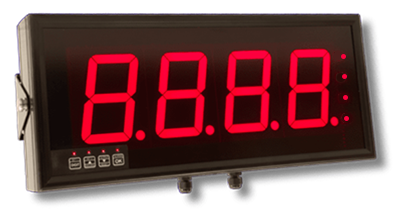
Features
- 6 inch (150 mm) digit height
- 4 digits with period or color dividers
- Choice of normal or outside viewing brightness
- Choice of signal inputs and functions
- Choice of panel mount, wall mount or suspension mount
- Choice of 95-264 Vac or 11-30 Vdc power
- Sealed to NEMA-4 (IP65)
- Only 3.0" (75 mm) deep
- Programmable from front panel
- Optional two or four 2A relay outputs, analog output, serial I/O
The Magna Series Large Digit Display with a 6-inch (150 mm) 4-digit configuration is a rugged industrial display engineered for clear data visualization. Featuring solid-segment LEDs for indoor use or optional 5 mm LEDs for outdoor brightness, it supports inputs including RS232/RS485, 4-20 mA, 0-10V, and pulse (0-100 kHz), with a 24V excitation output, 10-point linearization, and digital filtering (0-25s). It includes two or four 2A relays and an analog output, operating on 95-264 Vac or 11-30 Vdc, with an IP65 (NEMA-4X) seal and a temperature range of -40°C to 70°C, plus a heater option. Ideal for production monitoring and process control, it offers customizable LED colors and flexible mounting options.
Viewing distances up to 320 ft (100 m) are achieved with 8" digits. A rule of thumb is that viewing distance in feet is 40 times digit height in inches, or in metric terms, that viewing distance in meters is digit height in millimeters divided by 2.
Four digit heights are available a standard: 57 mm (2-1/4"), 102 mm (4.0"), 150 mm (5.9"), and 200 mm (7.9"). Solid segments are used for normal brightness 2.2" and 4.0" digits. Individual 5 mm LED pixels are used for larger digits and outdoor brightness versions. The number of digits can be 4, 6 or 8, depending on the display function.
Indoor or outdoor viewing: MAGNA Series Displays with normal brightness LEDs can be read over a machine or across a plant floor. Displays with outdoor brightness LEDs can be read across an industrial yard, parking lot or roadway, for example to display vehicle load. A heater option allows outdoor operation in winter in cold climates. Available mounting options are panel mount, wall mount and suspension mount. Environmental sealing to IP65 (NEMA-4X) is standard.
Choice of signal inputs: MAGNA Series Displays are available for different signal types, with can each be associated with 4 or 6 digits. Please click on the links below for detailed information by signal type:
- Serial data from PCs, PLCs, serial output transmitters, and smart sensors.
- Process input (e.g., 4-20 mA)
- Strain gauge / load cell input
- Temperature input, Pt100 RTD or thermocouple
- Pulse input for frequency or rate
- Pulse input for total or quadrature position
- Pulse input for operation as a clock or timer
Options available include two or four 2A relays, an analog output, an RS232 or RS485 serial data, and 95-264 Vac or 11-30 Vdc power.
Intuitive setup is normally provided by means of built-in front panel switches, which can be locked. It is also possible to remotely wire four pushbuttons to the display.
MAGNA Series Serial Input Large Digit Displays
Standard Large Digital Displays are available here. Prices are in US dollars and do not include shipping or duty charges (export sales).
Questions about your order? Please email our support@laurels.com
MAGNA units are built to order. MAGNA orders are non-cancelable and non-returnable.
Customized large digit displays are available by special quotation:
- LED colors green, blue, white, yellow (not limited to red).
- Digit heights of 12", 16", 24" or 32" (not just4", 6" or 8").
- 2 or 4 solid state relays (not just mechanical relays).
- Stainless steel housing (for food processing and pharmaceutical industries).
- Explosion-proof stainless steel housing rated for ATEX Zones 2 and 22 (equivalent to Class1 / Div 2).
- Custom signs with different colors, with fixed captions, and with multiple numeric display windows.


| Serial Data Input | |
|---|---|
| Serial Data Types | RS232 or RS485 (specify at time of order) |
| Serial Connector | Detachable plug-in screw terminals |
| Displayed Information | ASCII: Displays any character within 7-segment display limitations. Quant: Displays only numeric ASCII values. |
| Qa.Tot: Quantity totalizer. Can be used to accumulate weight values, for example after each batch. Uses a contact closure to trigger addition. | |
| Baud Rate | 300 to 115200 baud |
| Data Format | 701, 7e1, 7n2, 801, 8e1, 8n1, 8n2 |
| Termination Character | Hex 00 to FF |
| Reject Characters | Counted from termination character |
| Addressing | 00 (wildcard) to F7 |
| Process Signal Input | |
| A/D Converter | 20-bit resolution |
| Current Signal Types | 0-10 mA, 0-20 mA, 4-20 mA with 33Ω input resistance |
| Voltage Signal Types | 0-5V, 1-5V, 0-10V with 1 MΩ input resistance |
| Accuracy | ± 0.05% of range. |
| Tempco, Scale | ± 25 ppm/°C |
| Tempco, Offset | ± 30 ppm/°C |
| Excitation | 24 Vdc up to 40 mA, or ratiometric 0-10V for slide-wire |
| Strain Gauge / Load Cell Input | |
| A/D Converter | 20-bit resolution |
| Signal Gain | Suitable for 0.5 mV / V to 4 mV / V load cells |
| Accuracy | ± 0.05% of range. |
| Tempco, Scale | ± 25 ppm/°C |
| Tempco, Offset | ± 30 ppm/°C |
| Excitation Output | Isolated 10V up to 120 mA to power up to four 350Ω load cells in parallel |
| Pulse Input for Frequency, Rate, Total | |
| Number of Inputs | 4 |
| Signal Types | Configurable for contact closures, NPN or PNP proximity switches, 5V logic pulses, 24V pulses, quadrature |
| Debounce | Programmable to eliminate false counting from contact bounce. |
| Timing Reference | Temperature-controlled quartz crystal. |
| Pulse Input for Clock Operation | |
| Time Reference | Precision, temperature-compensated quartz crystal. |
| Clock Format | HH:MM or HH:MM:SS |
| Display | |
| Number of Digits | 4 or 6 |
| Digit Height | 57 mm (2-1/4"), 102 mm (4.0"), 150 mm (5.9"), or 200 mm (7.9") |
| Digit Color | Red |
| Brightness | Variable |
| Brightness | 8.8.8.8. or 8.8.8.8.8.8. (standard) |
| Clock Format | HH:MM or HH:MM:SS (optional, specify at time of order) |
| User Controls | |
| Scaling | Digital direct or theoretical scaling with scale & offset. |
| Filtering | Digital filtering, time constants adjustable from 0 to 25 sec. |
| Rounding | Selectable last-digit rounding of 1, 2, 5, 10, 20, 50 units. |
| Linearization | Up to 10 points, direct or theoretical calibration. |
| Logic Inputs | |
| Font Panel Controls | Calibration, Tare, Reset, Max/Min, Alarms |
| Logic Functions | Three logic inputs, individually configurable for Hold, Reset, Tare, Peak / Valley, Net/Gross, Memory Address. |
| Logic Levels | Normally open, NPN or contact closure input to activate. 5V open circuit, 1 mA switched current. |
| Power | |
| AC Power (standard) | 100-240 Vac |
| DC Power (option) | 11-30 Vdc |
| Max Consumption | 30 VA |
| Analog Output Option | |
| Output Levels | 0-20/4-20 mA into 0 to 500Ω, 0.4 μA resolution. 0-10V into loads > 600Ω, 0.2 mV resolution. -10 to +10V into loads > 600Ω, 0.4 mV resolution. |
| Resolution | 16 bits |
| Accuracy | 0.1% of range |
| Stability | 50 ppm/°Cl |
| Output Isolation | Isolated from input and power |
| Scaling | Digitally scalable |
| Special Features | Can be set to operate from net or gross value. |
| Alarm Output Option | |
| Relay Type | Two or four relays rated 2A, 250VAC, SPDT |
| Special Features | Adjustable hysteresis |
| In-flight compensation facility. | |
| Energize or de-energize on trip. | |
| Adjustable timers to set energize and de-energize delays. Can also be set to pulse for applications needing less than 100% duty cycle. | |
| In-band and out-of-band alarm function. | |
| Manual and automatic in-flight compensation. | |
| Can be set to operate from net or gross value. | |
| Serial Data Output Option | |
| Output Types | RS232 or RS485, addressable, on demand or continuous output. |
| Special Features | Can include time and date with RTC option fitted. Can be set to operate from net or gross value. |
| Environmental | |
| Storage Temp. | -20°C to +70°C |
| Operating Temp. | 0°C to 50°C, non-condensing. -25°C to 50°C, non-condensing, with MHTR AC heater option. |
| Sealing | IP65 (NEMA-4) standard, all-round |
| Connections | M12 compression glands for round cable, diameter 3.0 to 6.5 mm (0.118" to 0.256") |
| Mounting | Wall mount, suspension mount, panel mount |
| Approvals | |
| Types | Produced to IPC 610 Class 2 Standard |
| UL ISO9001:2008 QA | |
| Serial Data Input | |
|---|---|
| Serial Data Types | RS232 or RS485 (specify at time of order) |
| Serial Connector | Detachable plug-in screw terminals |
| Displayed Information | ASCII: Displays any character within 7-segment display limitations. Quant: Displays only numeric ASCII values. |
| Qa.Tot: Quantity totalizer. Can be used to accumulate weight values, for example after each batch. Uses a contact closure to trigger addition. | |
| Baud Rate | 300 to 115200 baud |
| Data Format | 701, 7e1, 7n2, 801, 8e1, 8n1, 8n2 |
| Termination Character | Hex 00 to FF |
| Reject Characters | Counted from termination character |
| Addressing | 00 (wildcard) to F7 |
| Process Signal Input | |
| A/D Converter | 20-bit resolution |
| Current Signal Types | 0-10 mA, 0-20 mA, 4-20 mA with 33Ω input resistance |
| Voltage Signal Types | 0-5V, 1-5V, 0-10V with 1 MΩ input resistance |
| Accuracy | ± 0.05% of range. |
| Tempco, Scale | ± 25 ppm/°C |
| Tempco, Offset | ± 30 ppm/°C |
| Excitation | 24 Vdc up to 40 mA, or ratiometric 0-10V for slide-wire |
| Strain Gauge / Load Cell Input | |
| A/D Converter | 20-bit resolution |
| Signal Gain | Suitable for 0.5 mV / V to 4 mV / V load cells |
| Accuracy | ± 0.05% of range. |
| Tempco, Scale | ± 25 ppm/°C |
| Tempco, Offset | ± 30 ppm/°C |
| Excitation Output | Isolated 10V up to 120 mA to power up to four 350Ω load cells in parallel |
| Pulse Input for Frequency, Rate, Total | |
| Number of Inputs | 4 |
| Signal Types | Configurable for contact closures, NPN or PNP proximity switches, 5V logic pulses, 24V pulses, quadrature |
| Debounce | Programmable to eliminate false counting from contact bounce. |
| Timing Reference | Temperature-controlled quartz crystal. |
| Pulse Input for Clock Operation | |
| Time Reference | Precision, temperature-compensated quartz crystal. |
| Clock Format | HH:MM or HH:MM:SS |
| Display | |
| Number of Digits | 4 or 6 |
| Digit Height | 57 mm (2-1/4"), 102 mm (4.0"), 150 mm (5.9"), or 200 mm (7.9") |
| Digit Color | Red |
| Brightness | Variable |
| Brightness | 8.8.8.8. or 8.8.8.8.8.8. (standard) |
| Clock Format | HH:MM or HH:MM:SS (optional, specify at time of order) |
| User Controls | |
| Scaling | Digital direct or theoretical scaling with scale & offset. |
| Filtering | Digital filtering, time constants adjustable from 0 to 25 sec. |
| Rounding | Selectable last-digit rounding of 1, 2, 5, 10, 20, 50 units. |
| Linearization | Up to 10 points, direct or theoretical calibration. |
| Logic Inputs | |
| Font Panel Controls | Calibration, Tare, Reset, Max/Min, Alarms |
| Logic Functions | Three logic inputs, individually configurable for Hold, Reset, Tare, Peak / Valley, Net/Gross, Memory Address. |
| Logic Levels | Normally open, NPN or contact closure input to activate. 5V open circuit, 1 mA switched current. |
| Power | |
| AC Power (standard) | 100-240 Vac |
| DC Power (option) | 11-30 Vdc |
| Max Consumption | 30 VA |
| Analog Output Option | |
| Output Levels | 0-20/4-20 mA into 0 to 500Ω, 0.4 μA resolution. 0-10V into loads > 600Ω, 0.2 mV resolution. -10 to +10V into loads > 600Ω, 0.4 mV resolution. |
| Resolution | 16 bits |
| Accuracy | 0.1% of range |
| Stability | 50 ppm/°Cl |
| Output Isolation | Isolated from input and power |
| Scaling | Digitally scalable |
| Special Features | Can be set to operate from net or gross value. |
| Alarm Output Option | |
| Relay Type | Two or four relays rated 2A, 250VAC, SPDT |
| Special Features | Adjustable hysteresis |
| In-flight compensation facility. | |
| Energize or de-energize on trip. | |
| Adjustable timers to set energize and de-energize delays. Can also be set to pulse for applications needing less than 100% duty cycle. | |
| In-band and out-of-band alarm function. | |
| Manual and automatic in-flight compensation. | |
| Can be set to operate from net or gross value. | |
| Serial Data Output Option | |
| Output Types | RS232 or RS485, addressable, on demand or continuous output. |
| Special Features | Can include time and date with RTC option fitted. Can be set to operate from net or gross value. |
| Environmental | |
| Storage Temp. | -20°C to +70°C |
| Operating Temp. | 0°C to 50°C, non-condensing. -25°C to 50°C, non-condensing, with MHTR AC heater option. |
| Sealing | IP65 (NEMA-4) standard, all-round |
| Connections | M12 compression glands for round cable, diameter 3.0 to 6.5 mm (0.118" to 0.256") |
| Mounting | Wall mount, suspension mount, panel mount |
| Meter modifiying options (not shippable separately from meter) | |
| MRDLV | Daylight viewing brightness for operation down to 0°C (32°F) instead of normal indoor brightness. |
| MHTR | Heater for outdoor operation down to -25°C (-13°F). |
| MPS2 | 11-30 Vdc power instead of normal 85-265 Vac power. |
| UM | Extra case width for 2 blank digits. |
| Use UM for units of measure like ºC. Required with M24 for relay, analog output or serial output options. Added at no charge with MHTR for M24 or M44. | |
| Approvals | |
| Types | Produced to IPC 610 Class 2 Standard |
| UL ISO9001:2008 QA | |
Number of Digits & Case Dimensions

| Serial Data Input | 4 Digits | 6 Digits |
|---|---|---|
| Serial Data Input |  |
 |
| Process, Strain Gauge, Rate / Frequency, Totalizer, Quadrature |
|
|
| Clock / Timer |  |
 |
| Digit Height | Case Width x Height | Case Width x Height |
| 57 mm (2.2") | 280 x 155 mm (11.0" x 6.1") | 376 x 155 mm (14.8" x 6.1") |
| 102 mm (4.0") | 434 x 196 mm (16.7" x 7.7") | 616 x 196 mm (24.3" x 7.7") |
| 150 mm (5.9") | 580 x 247 mm (22.8" x 9.8") | 820 x 247 mm (32.3" x 9.8") |
| 200 mm (7.9") | 750 x 290 mm (29.5" x 11.4") | 1072 x 290 mm (42.2" x 11.4") |
| Case depth | 75 mm (3.0") | |
Number of Digits & Case Dimensions
| Serial Data Input | 4 Digits | 6 Digits |
|---|---|---|
| Serial Data Input | |
|
| Process, Strain Gauge, Rate / Frequency, Totalizer, Quadrature |
|
|
| Clock / Timer | |
|
| Digit Height | Case Width x Height | Case Width x Height |
| 57 mm (2.2") | 280 x 155 mm (11.0" x 6.1") | 376 x 155 mm (14.8" x 6.1") |
| 102 mm (4.0") | 434 x 196 mm (16.7" x 7.7") | 616 x 196 mm (24.3" x 7.7") |
| 150 mm (5.9") | 580 x 247 mm (22.8" x 9.8") | 820 x 247 mm (32.3" x 9.8") |
| 200 mm (7.9") | 750 x 290 mm (29.5" x 11.4") | 1072 x 290 mm (42.2" x 11.4") |
| Case depth | 75 mm (3.0") | |
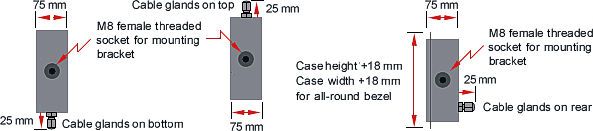
| Note: | Models with 57 mm (2.2") digits, 4 digits and 4 relays require the larger 6-digit case. For panel mount versions, add 18 mm (0.7") to case width and height for bezel and 25 mm (1.0") for cable gland in back of case. |
MAGNA Large Digit Display Product Bulletin
- Product Bulletin: 4 pages, 0.1 MB
MAGNA Large Digit Display Manuals
- MAGNA Process Signal (4-20 mA, 0-10V) Input Manual: 45 pages, 0.5 MB
- MAGNA Clock-Timer Manual: 31 pages, 0.4 MB
- MAGNA Strain Gauge & Load Cell Input Manual: 45 pages, 0.5 MB
- MAGNA RS232 & RS485 Data Serial Data Input Manual: 36 pages, 0.4 MB
- MAGNA Totalizer & Rate Meter Manual: 47 pages, 0.5 MB
- MAGNA Thermocouple & RTD Input Manual: 45 pages, 0.5 MB
- MAGNA Alarm Options Manual: 32 pages, 0.25 MB
- MAGNA Analog Output Options Manual: 12 pages, 0.1 MB
- MAGNA Serial Output Options Manual: 18 pages, 0.2 MB
Understanding the Magna Series Large Digit Display - 6 inches (150 mm), 4 Digit Display: Features and Benefits
The Magna Series Large Digit Display is a sophisticated, versatile display solution designed for a range of applications that require clear, visible numerical information. This article delves into the features and benefits of the 6-inch (150 mm) 4-digit model, highlighting its design and functional advantages.
Key Features
1. Impressive Digit Size
6-Inch (150 mm) Digit Height: The large 6-inch digits ensure that information is easily readable from a distance, making this display ideal for settings where visibility is critical, such as industrial environments or large public areas.
2. Customizable Display Options
4 Digits with Period or Color Dividers: Users can choose from various display configurations, including the option to add periods or color dividers between digits. This flexibility allows for enhanced clarity and customization based on specific requirements.
3. Brightness Adjustments
Normal or Outside Viewing Brightness: The display offers the choice between standard brightness and a higher intensity option for viewing in bright outdoor environments. This adaptability ensures optimal readability in diverse lighting conditions.
Versatile Signal Inputs and Functions
Choice of Signal Inputs and Functions: The display accommodates various signal inputs, providing versatility for integration with different systems and applications. This feature allows users to tailor the display's functionality to their specific needs.
4. Mounting Options
Panel Mount, Wall Mount, or Suspension Mount: The Magna Series Display offers multiple mounting options, including panel, wall, or suspension mounts. This flexibility ensures that the display can be installed in the most convenient and effective location for its intended use.
5. Power Supply Flexibility
Choice of 95-264 Vac or 11-30 Vdc Power: The display supports a wide range of power supply options, making it adaptable to various power environments and ensuring reliable operation across different settings.
6. Durability and Protection
Sealed to NEMA-4 (IP65): With a NEMA-4 (IP65) rating, the Magna Series Display is designed to withstand harsh environmental conditions, including dust and water exposure. This makes it suitable for use in demanding industrial environments.
7. Compact Depth
Only 3.0" (75 mm) Deep: Despite its large digit size, the display has a compact depth, making it easy to install in confined spaces without sacrificing visibility or functionality.
8. User-Friendly Programming
Programmable from Front Panel: The display can be programmed directly from the front panel, simplifying configuration and adjustments. This user-friendly feature reduces the need for external programming tools.
9. Optional Outputs
Two or Four 2A Relay Outputs, Analog Output, Serial I/O: Users can enhance the display's functionality with optional relay outputs, analog outputs, and serial I/O options. These features provide additional flexibility for integrating the display with other systems and automating processes.
Conclusion
The Magna Series Large Digit Display with a 6-inch (150 mm) digit height and 4-digit configuration offers a robust and versatile solution for displaying numerical information in various environments. Its customizable features, durability, and adaptability make it a valuable tool for applications requiring high visibility, reliable performance, and flexible installation options. Whether used in industrial settings, public spaces, or other demanding environments, the Magna Series Display ensures clear and effective communication of critical information.
Applications of the Magna Series Large Digit Display (6 inches, 4 Digit Display) in Industrial Settings
In the realm of industrial applications, precision and clarity in data visualization are paramount. The Magna Series Large Digit Display, featuring a 6-inch (150 mm) 4-digit display, emerges as a key player in this domain. Designed to offer both readability and functionality, this display unit finds its niche across various industrial environments. Here's a look at where and why this robust display is utilized:
1. Manufacturing Plants
In manufacturing plants, the Magna Series Large Digit Display excels in showcasing real-time operational data. This can include metrics such as production counts, machine speeds, or temperature readings. The large digits ensure that operators and supervisors can easily read critical information from a distance, thereby improving efficiency and reducing the likelihood of errors.
2. Warehousing and Logistics
In warehouses and logistics centers, this display is often used to indicate batch numbers, inventory counts, or other vital metrics. Its large, clear digits allow for quick scanning and verification, which is essential for maintaining accurate inventory records and streamlining logistical operations.
3. Process Control Systems
For process control systems that monitor and manage industrial processes, the Magna Series display provides a clear and concise readout of process variables. This might include pressure, flow rates, or chemical concentrations. The large display ensures that these critical metrics are visible to operators at a glance, facilitating timely decision-making and response.
4. Energy Monitoring
In energy monitoring applications, such as tracking power consumption or electrical load, the Magna Series display offers a straightforward way to present data. Its size and clarity make it suitable for use in environments where quick readings are necessary to monitor and manage energy usage effectively.
5. Testing and Calibration
During testing and calibration procedures, accurate and readable data displays are crucial. The Magna Series Large Digit Display is employed to present test results or calibration values clearly. Its large digits reduce the risk of misinterpretation and enhance the efficiency of testing processes.
6. Industrial Automation
In industrial automation setups, where various sensors and instruments feed data into a central system, the Magna Series display acts as an intuitive interface for data visualization. It helps in monitoring system status and performance metrics, contributing to smooth and efficient automation processes.
7. Safety Monitoring
For safety-critical applications, such as monitoring hazardous material levels or emergency systems, the Magna Series display provides a reliable means of conveying important safety information. The visibility and readability of the display are essential for ensuring that safety parameters are met and that any issues are promptly addressed.
Key Features and Benefits
- High Readability: The 6-inch digits are designed to be seen from a distance, which is vital in large industrial spaces.
- Durability: Built to withstand the rigors of industrial environments, including exposure to dust, moisture, and vibrations.
- Versatility: Adaptable to a range of applications, from basic measurements to complex process monitoring.
- Ease of Integration: Compatible with various industrial systems and can be easily incorporated into existing setups.
In summary, the Magna Series Large Digit Display (6 inches, 4 Digit Display) plays a crucial role in various industrial applications by providing clear, readable, and reliable data visualization. Its versatility and robust design make it an invaluable tool for enhancing operational efficiency, safety, and accuracy across diverse industrial settings.
Frequently Asked Questions About This Model
How much bigger is the case on the 6-inch model compared to the 4-inch version?
The 6-inch, 4-digit case measures 580 x 247 mm (22.8" x 9.8"), versus 434 x 196 mm (16.7" x 7.7") for the 4-inch, 4-digit case — a meaningful jump in both width and height that's worth accounting for during panel or wall layout before ordering.
Does jumping from 4-inch to 6-inch digits actually make a practical difference in readability?
Yes — going by the 40x rule, the readable distance increases from roughly 160 feet to roughly 240 feet, an 80-foot gain that matters in large plants, yards, or public-facing installations where the extra distance is the difference between legible and not.
Is this model overkill for a typical control panel application?
Not necessarily — while the 6-inch size is aimed at longer sightlines, it's also used on standard control panels simply for extra visual prominence, such as a key safety metric management wants visible across the room rather than only up close.
Can this display be used for energy or power consumption monitoring?
Yes — with a process signal input configuration, this model can show live power consumption or electrical load readings, and its size makes it suitable for facility-wide energy dashboards where the reading needs to be visible from across a room.
Is this model appropriate for safety-critical alerts like hazardous material levels?
Yes — the 6-inch digit height is specifically suited to safety monitoring applications where a status or level reading needs to be seen at a glance from a distance, reducing the chance an alert goes unnoticed.
Can this display be used to show calibration or test results during equipment testing?
Yes — the large, clear digits are well suited to displaying test results or calibration values where misreading a digit during a testing procedure could lead to an incorrect calibration being recorded.
What's the price difference between the 4-digit and 6-digit versions of this 6-inch model?
The 6-inch, 6-digit case is wider (820 x 247 mm vs. 580 x 247 mm for the 4-digit), and the added digits, wider case, and any additional signal input requirements will factor into the price difference — check current pricing for both configurations before deciding which fits the budget and the data being displayed.
Does this model support integration into an existing industrial automation system?
Yes — it accepts a range of signal inputs so it can act as a visual interface for a larger automation setup, showing status or performance metrics fed from other sensors and instruments in the system.
What's the tradeoff between choosing this 6-inch model versus the 8-inch model?
The 6-inch model covers viewing distances up to roughly 240 feet in a smaller, less expensive case than the 8-inch model, which extends to about 320 feet; the 8-inch model is worth the larger footprint only when the installation genuinely needs that extra range.
Can I get this display with a unit-of-measure label next to the digits?
Yes — the UM option adds extra case width for two blank digits, commonly used to add a unit of measure label (such as °C) alongside the numeric reading.
Questions From the Field
We're mounting this on an existing panel and the cutout was sized for the 4-inch model — what should we check?
Since the 6-inch, 4-digit case is noticeably larger (580 x 247 mm versus 434 x 196 mm for the 4-inch case), confirming the panel cutout and available mounting space against the actual 6-inch case dimensions before installation is the standard first step to avoid a mid-install surprise.
Our energy monitoring readout seems to lag behind the actual load changes — what should we check?
Checking the digital filtering time constant, adjustable from 0 to 25 seconds, is the standard first step; a longer filter setting smooths the reading but also slows how quickly it reflects real changes in load.
The display is readable up close but washes out from across the plant floor — what's going on?
This points to the unit being configured with normal (indoor) brightness rather than the outside/high-intensity viewing option; confirming which brightness setting was ordered is the standard first check for readability that degrades with distance.
We're using this for a safety alert and want to confirm it won't be missed — any configuration to check?
Reviewing the alarm relay's in-band/out-of-band function and hysteresis settings against the intended alert condition is worth doing, since a poorly set hysteresis or trip threshold can cause a safety indicator to flicker or fail to latch on a marginal reading.
Our test technicians are second-guessing calibration values shown on this display — what should we check?
Confirming the digit rounding setting (selectable at 1, 2, 5, 10, 20, or 50 units) matches what the calibration procedure expects is a common source of confusion, since a coarser rounding setting can make a value look different from the underlying reading than technicians expect.
We ordered the 6-inch model but the case footprint doesn't match what our drawings show — why?
Case dimensions differ between the 4-digit and 6-digit versions at the same digit height (580 x 247 mm vs. 820 x 247 mm for 6-inch), so confirming which digit-count version was actually ordered against the drawings is the standard first check.
Our display is showing inconsistent values from an automation system feed — what should we check?
Since this model can take input from multiple upstream sensors or instruments as part of a larger automation setup, confirming the correct signal input type and scaling parameters are configured for the specific feed connected is the standard first step before suspecting a display fault.
We need a unit of measure shown next to the reading but didn't order the UM option — can this be added later?
The UM option adds physical case width for two blank digits and is a build-time configuration, so retrofitting it typically isn't a simple field modification; checking with support before ordering is the way to avoid needing a case swap later.
